Sending
Sending Payments:
Lightning Network payments are straightforward but require some consideration and validation to ensure successful and secure fund transfers. The payment sending process involves decoding payment requests, validating payment details, executing the payment, and tracking its progress until completion or failure.
Unlike traditional payment systems, Lightning payments are near-instantaneous but require awareness of possible routing failures, fee management, and payment validation. LND provides robust APIs for managing the entire payment lifecycle, from initial invoice inspection to final settlement confirmation.
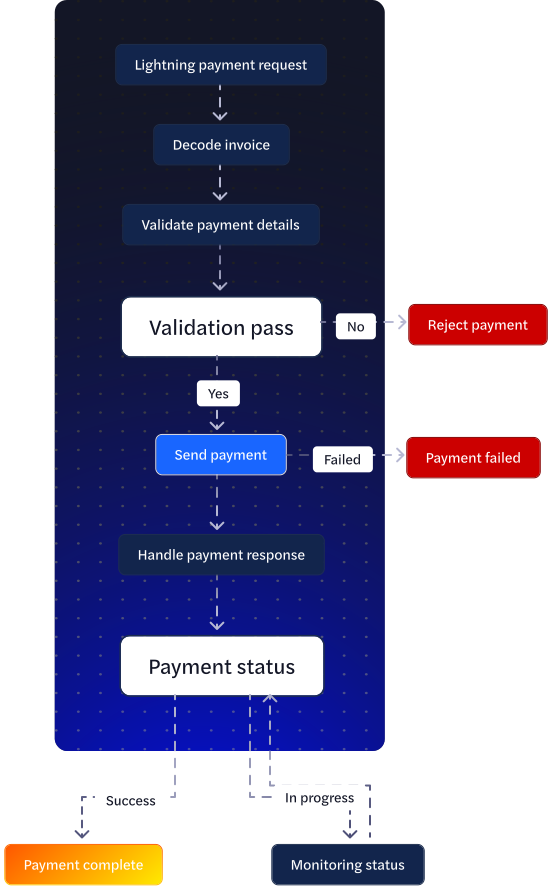
1. Decode payment request (invoice)
Before sending any Lightning payment, you should decode the BOLT11 payment request to inspect its contents and validate the payment details. This critical first step allows you to verify the payment amount, destination, expiry time, and description before committing funds.
Decoding reveals essential information including the recipient's public key, the exact amount requested, when the invoice expires, and any routing hints that may be required for successful payment delivery. This step is mandatory for implementing proper payment validation and user confirmation flows.
const decodeInvoice = async (paymentRequest) => {
  try {
    const decoded = await lnd.get(/v1/payreq/${paymentRequest});
    return decoded.data;
  } catch (error) {
    console.error("Invoice decode failed:", error);
    throw error;
  }
};
2. Send Payment
After decoding and validating the invoice, you can initiate the actual payment. This step involves setting fee limits, (optional) CLTV limits, and executing the payment via LND’s payment engine. LND will attempt to find a route and can retry internally, but it will always respect the fee limits you set on this request.
Why fee limits matter (and how to set them)
Lightning fees are dynamic. If you cap fees too low, routing will fail. If you set no cap (or a very high cap), you risk fee siphoning on long/fragile routes. You want a balance:
Recommended baseline policy
- Default cap: fee_limit.percent = 1 (≈1% of payment amount)
- Absolute max cap: fee_limit.fixed = 100 (sats) for small payments
- Use the smaller of the two caps (1% or 100 sats) to bound costs reasonably.
- Add a second attempt if the first fails for common routing/fee reasons, by raising the cap a notch (e.g., 2% and/or a higher fixed cap like 500–1000 sats, still bounded).
When to retry with higher fees
- Errors like “no route”, “insufficient fee”, or repeated timeouts suggest your cap is too tight (or liquidity is poor).
- Bump fees once (maybe twice at most), then stop. Unlimited retries with ever-higher caps can get expensive.
const sendPayment = async (paymentRequest) => {
  try {
    // 1. Decode and verify the invoice
    const decodedInvoice = await decodeInvoice(paymentRequest);
    // 2. Verify payment details
    validatePaymentDetails(decodedInvoice);
    // 3. Send payment
    const payment = await lnd.post("/v1/channels/transactions", {
      payment_request: paymentRequest,
      fee_limit: { fixed: 1000 } // Protect against fee siphoning
    });

    return payment.data;
  } catch (error) {
    console.error("Payment failed:", error);
    throw error;
  }
};
3. Handle Payment Response:
Payment responses require careful handling to distinguish between successful payments, failed attempts, and payments still in progress. Implementing proper response handling ensures your application correctly processes payment outcomes and provides appropriate user feedback.
Lightning payments can fail for various reasons including insufficient liquidity, routing failures, or invoice expiration. Your validation logic should check payment amounts against business limits, verify destinations are authorized, and ensure invoices haven't expired before sending.
def validate_payment_details(decoded_invoice: Dict[str, Any]) -> None:
    """
    Implement your validation logic:
    - Check amount is within limits
    - Verify destination is allowed
    - Check expiry
    - Validate other business rules
    """
Implementation Considerations
Security: Always decode and validate invoices before payment—verify the amount matches user expectations and the destination pubkey is authorized. Set conservative fee limits (typically 1-5% of payment amount) to prevent fee siphoning attacks. Never automatically retry payments without user confirmation, as this could lead to duplicate payments if the first attempt actually succeeded but appeared to fail.
Error Handling: Lightning payments usually fail due to routing issues—implement proper retry logic with exponential backoff (start at 5 seconds, max 60 seconds between attempts). Handle specific payment failure reasons: FAILURE_REASON_TIMEOUT suggests trying a different route, while FAILURE_REASON_NO_ROUTE indicates insufficient liquidity.
Scalability: For high-volume payment processing, use the streaming SendPaymentV2 gRPC method instead of REST endpoints to get real-time payment status updates. Batch multiple small payments when possible to reduce routing overhead.
User Experience: Show payment progress immediately after initiation—Lightning payments typically complete within 5-10 seconds but can take up to 60 seconds in challenging routing conditions. Display estimated fees during payment confirmation to set proper expectations. Implement payment status polling or WebSocket updates to provide real-time feedback without requiring page refreshes.