Configuration
Basic setup
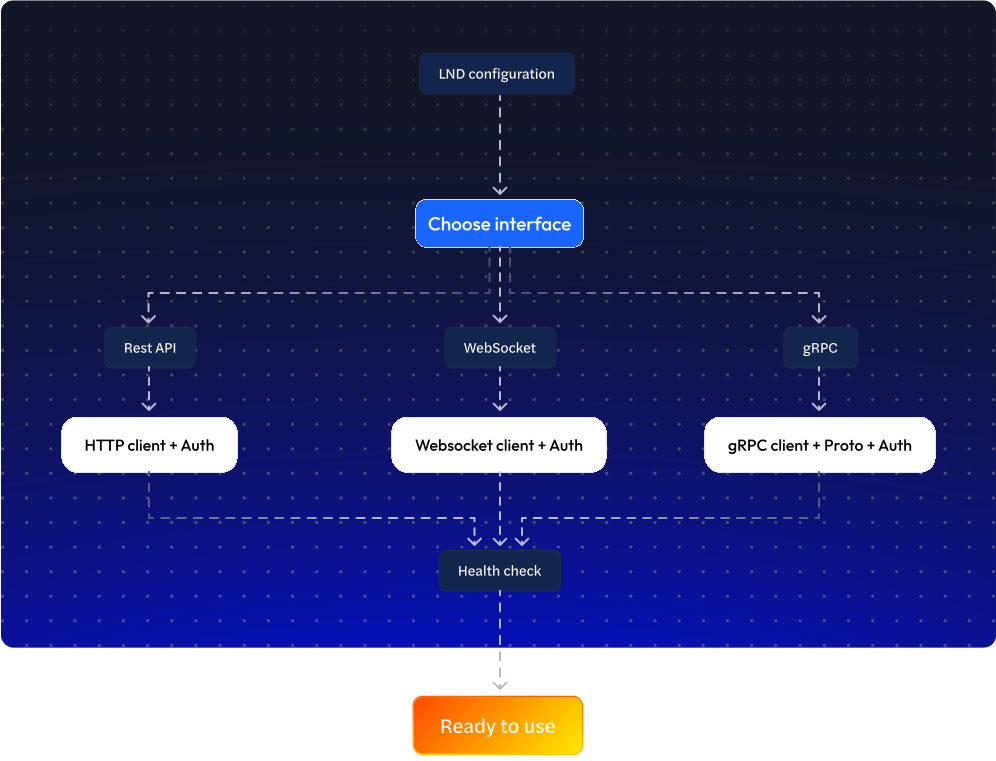
LND provides multiple interfaces for interacting with your Lightning node, each suited to different application architectures and requirements. This guide covers configuring REST, WebSocket, and gRPC clients to connect with your LND node using proper authentication and connection management.
Each interface offers different advantages: REST for simple HTTP integrations, WebSockets for real-time browser applications, and gRPC for high-performance server-side implementations. All methods use the same macaroon-based authentication system but require different client setup approaches.
REST Configuration
REST provides a familiar HTTP-based interface that works with standard web libraries and tools. It's the simplest to implement and debug, making it ideal for web applications, simple integrations, and development environments.
1. Configure API Client
Create an authenticated HTTP client that will handle all communication with your LND node's REST interface. The client configuration includes the node's REST endpoint URL and the required authentication headers.
const lnd = axios.create({
  baseURL: https://${HOST}:8080,
  headers: {
    "Content-Type": "application/json",
    "Grpc-Metadata-Macaroon": MACAROON
  }
});
2. Macaroon Authentication
Macaroons can be provided either as hex-encoded strings (common in environment variables) or read directly from macaroon files. Choose the method that best fits your deployment and security requirements.
File path:
Best for: Local development, server deployments where you have direct file system access to macaroon files.
const fs = require('fs');
const HOST = process.env.LND_HOST;
const MACAROON_PATH = process.env.MACAROON_PATH || '/path/to/admin.macaroon';

// Read macaroon from file and convert to hex
const MACAROON = fs.readFileSync(MACAROON_PATH).toString('hex');

// Configure client with file-based macaroon
const lnd = axios.create({
  baseURL: `https://${HOST}:8080`,
  headers: {
    "Content-Type": "application/json",
    "Grpc-Metadata-Macaroon": MACAROON
  }
});
Hex Value:
Best for: Production deployments, containerized environments, or when macaroons are stored in environment variables or secret management systems.
const HOST = process.env.LND_HOST;
const MACAROON = process.env.LND_MACAROON; // Hex string from environment

// Configure client with hex macaroon from env
const lnd = axios.create({
  baseURL: `https://${HOST}:8080`,
  headers: {
    "Content-Type": "application/json",
    "Grpc-Metadata-Macaroon": MACAROON
  }
});
3. Basic health check / node info
Verify your REST configuration by testing connectivity and retrieving basic node information.
const checkNodeStatus = async () => {
  try {
    const info = await lnd.get("/v1/getinfo");
    return info.data;
  } catch (error) {
    console.error("Node status check failed:", error);
    throw error;
  }
};
WebSocket Configuration
WebSockets provide real-time, bidirectional communication for streaming data from your LND node. This interface is ideal for browser applications, dashboards, and any scenario requiring immediate notifications of node events.
WebSocket connections to LND require the same macaroon authentication as REST but use persistent connections for continuous data streaming. The connection URL includes a method=GET parameter to indicate streaming mode.
1. Configure WebSocket Client
WebSocket clients connect to LND's streaming endpoints using secure WebSocket connections (WSS) with macaroon authentication in the connection headers.
const WebSocket = require('ws');

// Configuration from environment variables
const HOST = process.env.LND_HOST || 'localhost';
const MACAROON = process.env.LND_MACAROON; // Hex-encoded macaroon

// Create WebSocket client configuration
const createWebSocketClient = (endpoint) => {
  // For streaming RPCs over REST, LND expects the ?method=GET query param
  const wsUrl = `wss://${HOST}:8080${endpoint}?method=GET`;

  return new WebSocket(wsUrl, {
    rejectUnauthorized: false, // Set to true if using trusted TLS cert
    headers: {
      'Grpc-Metadata-Macaroon': MACAROON
    }
  });
};

// Example: Connect to invoice subscription endpoint
const ws = createWebSocketClient('/v1/invoices/subscribe');
2. Authentication Setup
WebSocket authentication uses the same macaroon system as REST but passes credentials through connection headers rather than per-request headers.
// Option 1: Hex-encoded macaroon from environment variable
function setupWebSocketAuthFromHex() {
    $macaroonHex = $_ENV['LND_MACAROON'] ?? null;

    if (!$macaroonHex) {
        throw new Exception('LND_MACAROON environment variable not set');
    }

    return [
        'headers' => [
            'Grpc-Metadata-Macaroon' => $macaroonHex
        ]
    ];
}

// Option 2: Read macaroon from file
function setupWebSocketAuthFromFile() {
    $macaroonPath = $_ENV['MACAROON_PATH'] ?? '/path/to/admin.macaroon';

    try {
        $macaroonBytes = file_get_contents($macaroonPath);
        if ($macaroonBytes === false) {
            throw new Exception("Cannot read macaroon file");
        }

        $macaroonHex = bin2hex($macaroonBytes);

        return [
            'headers' => [
                'Grpc-Metadata-Macaroon' => $macaroonHex
            ]
        ];
    } catch (Exception $e) {
        throw new Exception("Failed to read macaroon: " . $e->getMessage());
    }
}

// Create authenticated WebSocket connection
function createAuthenticatedWebSocket($endpoint) {
    global $HOST;

    $wsUrl = "wss://{$HOST}:8080{$endpoint}?method=GET";
    $authOptions = setupWebSocketAuthFromHex(); // or setupWebSocketAuthFromFile()

    // Merge authentication with SSL options
    $options = array_merge($authOptions, [
        'context' => stream_context_create([
            'ssl' => [
                'verify_peer' => false,
                'verify_peer_name' => false,
                'allow_self_signed' => true
            ]
        ]),
        'timeout' => 60
    ]);

    return new Client($wsUrl, $options);
}
3. Connection Health Check
Test your WebSocket configuration by establishing a connection and verifying proper authentication and data reception.
const testWebSocketConnection = async () => {
  return new Promise((resolve, reject) => {
    const ws = createAuthenticatedWebSocket('/v1/getinfo');
    let connectionTimeout;

    // Set connection timeout
    connectionTimeout = setTimeout(() => {
      ws.close();
      reject(new Error('WebSocket connection timeout'));
    }, 10000); // 10 second timeout

    ws.on('open', () => {
      console.log('✅ WebSocket connection established');

      // For non-streaming endpoints, send empty request
      ws.send(JSON.stringify({}));
    });

    ws.on('message', (data) => {
      clearTimeout(connectionTimeout);

      try {
        // REST proxy wraps response in { result: ... }
        const response = JSON.parse(data);
        const info = response.result || response;

        console.log('📡 Node info received:');
        console.log(`  • Alias: ${info.alias}`);
        console.log(`  • Version: ${info.version}`);
        console.log(`  • Chains: ${info.chains?.join(', ')}`);
        console.log(`  • Block Height: ${info.block_height}`);

        ws.close();
        resolve(info);
      } catch (error) {
        ws.close();
        reject(new Error(`Failed to parse response: ${error.message}`));
      }
    });

    ws.on('error', (error) => {
      clearTimeout(connectionTimeout);
      reject(new Error(`WebSocket error: ${error.message}`));
    });

    ws.on('close', () => {
      clearTimeout(connectionTimeout);
      console.log('🔌 WebSocket connection closed');
    });
  });
};
gRPC Configuration
gRPC provides the most efficient and feature-complete interface to LND, offering strongly-typed responses, bidirectional streaming, and the lowest latency communication. This interface is ideal for production applications requiring high performance and reliability.
gRPC clients require proto file definitions, SSL certificate handling, and metadata-based authentication. While more complex to set up than REST, gRPC offers superior performance and access to the complete LND API surface.
1. Setup and Dependencies
gRPC requires proto file definitions and specific client libraries for each language. Download the appropriate proto files and install required dependencies before configuring your client.
<?php
// 1. Setup and Dependencies

/**
 * Install required dependencies:
 *
 * composer require grpc/grpc
 * composer require google/protobuf
 *
 * Install PHP gRPC extension:
 * pecl install grpc
 *
 * Download proto files for your LND version:
 * wget https://raw.githubusercontent.com/lightningnetwork/lnd/master/lnrpc/lightning.proto
 * wget https://raw.githubusercontent.com/lightningnetwork/lnd/master/lnrpc/routerrpc/router.proto
 * wget https://raw.githubusercontent.com/lightningnetwork/lnd/master/lnrpc/invoicesrpc/invoices.proto
 *
 * Compile proto files:
 * protoc --php_out=. --grpc_out=. --plugin=protoc-gen-grpc=`which grpc_php_plugin` lightning.proto
 * protoc --php_out=. --grpc_out=. --plugin=protoc-gen-grpc=`which grpc_php_plugin` routerrpc/router.proto
 * protoc --php_out=. --grpc_out=. --plugin=protoc-gen-grpc=`which grpc_php_plugin` invoicesrpc/invoices.proto
 */

require_once __DIR__ . '/vendor/autoload.php';

// Import generated proto classes
require_once __DIR__ . '/Lnrpc/LightningClient.php';
require_once __DIR__ . '/Lnrpc/GetInfoRequest.php';
require_once __DIR__ . '/Lnrpc/GetInfoResponse.php';
require_once __DIR__ . '/Lnrpc/WalletBalanceRequest.php';
require_once __DIR__ . '/Lnrpc/WalletBalanceResponse.php';
require_once __DIR__ . '/Lnrpc/ListInvoiceRequest.php';
require_once __DIR__ . '/Lnrpc/ListInvoiceResponse.php';
require_once __DIR__ . '/Lnrpc/InvoiceSubscription.php';
require_once __DIR__ . '/Lnrpc/Invoice.php';
require_once __DIR__ . '/Routerrpc/RouterClient.php';
require_once __DIR__ . '/Invoicesrpc/InvoicesClient.php';

use Lnrpc\LightningClient;
use Lnrpc\GetInfoRequest;
use Lnrpc\WalletBalanceRequest;
use Lnrpc\ListInvoiceRequest;
use Lnrpc\InvoiceSubscription;
use Routerrpc\RouterClient;
use Invoicesrpc\InvoicesClient;
use Grpc\ChannelCredentials;

// Configuration from environment variables
$LND_HOST = $_ENV['LND_HOST'] ?? 'localhost';
$LND_PORT = $_ENV['LND_PORT'] ?? '10009';
2. Configure gRPC Client
Create a gRPC client with proper SSL credentials and macaroon authentication metadata. The client handles both unary calls and streaming RPCs.
class LndClient {
    private $host;
    private $port;
    private $macaroonPath;
    private $tlsCertPath;
    private $credentials;
    private $lightning;
    private $router;
    private $invoices;

    /**
     * Create gRPC client factory for LND services
     */
    public function __construct($host = null, $port = null, $macaroonPath = null, $tlsCertPath = null) {
        global $LND_HOST, $LND_PORT, $MACAROON_PATH, $TLS_CERT_PATH;

        $this->host = $host ?? $LND_HOST;
        $this->port = $port ?? $LND_PORT;
        $this->macaroonPath = $macaroonPath ?? $MACAROON_PATH;
        $this->tlsCertPath = $tlsCertPath ?? $TLS_CERT_PATH;

        // Create credentials
        $this->credentials = $this->createCredentials();

        // Create service clients
        $this->createServiceClients();
    }

    /**
     * Create combined SSL and macaroon credentials
     */
    private function createCredentials() {
        // Read macaroon
        if (!file_exists($this->macaroonPath)) {
            throw new Exception("Macaroon file not found: {$this->macaroonPath}");
        }

        $macaroonBytes = file_get_contents($this->macaroonPath);
        if ($macaroonBytes === false) {
            throw new Exception("Failed to read macaroon file");
        }

        $macaroonHex = bin2hex($macaroonBytes);

        // Create SSL credentials
        if ($this->tlsCertPath && file_exists($this->tlsCertPath)) {
            // Use custom TLS certificate if provided
            $certBytes = file_get_contents($this->tlsCertPath);
            if ($certBytes === false) {
                throw new Exception("Failed to read TLS certificate");
            }
            $sslCreds = ChannelCredentials::createSsl($certBytes);
        } else {
            // Use default SSL without custom cert (for remote connections)
            $sslCreds = ChannelCredentials::createSsl();
        }

        // Create metadata for macaroon
        $metadata = [
            'macaroon' => [$macaroonHex]
        ];

        return [
            'credentials' => $sslCreds,
            'metadata' => $metadata
        ];
    }

    /**
     * Create service clients with authentication
     */
    private function createServiceClients() {
        $endpoint = "{$this->host}:{$this->port}";
        $opts = [
            'credentials' => $this->credentials['credentials'],
            'update_metadata' => function($metaData) {
                foreach ($this->credentials['metadata'] as $key => $value) {
                    $metaData[$key] = $value;
                }
                return $metaData;
            }
        ];

        // Create Lightning client
        $this->lightning = new LightningClient($endpoint, $opts);

        // Create Router client
        $this->router = new RouterClient($endpoint, $opts);

        // Create Invoices client
        $this->invoices = new InvoicesClient($endpoint, $opts);
    }

    /**
     * Get Lightning service client
     */
    public function getLightning() {
        return $this->lightning;
    }

    /**
     * Get Router service client
     */
    public function getRouter() {
        return $this->router;
    }

    /**
     * Get Invoices service client
     */
    public function getInvoices() {
        return $this->invoices;
    }
}

// Factory function to create LND client for specific service
function createLndClient($service = 'Lightning', $host = null, $port = null, $macaroonPath = null, $tlsCertPath = null) {
    $client = new LndClient($host, $port, $macaroonPath, $tlsCertPath);

    switch ($service) {
        case 'Lightning':
            return $client->getLightning();
        case 'Router':
            return $client->getRouter();
        case 'Invoices':
            return $client->getInvoices();
        default:
            throw new InvalidArgumentException("Unknown service: {$service}");
    }
}

// Singleton pattern for client instance
class LndClientSingleton {
    private static $instance = null;

    public static function getClient() {
        if (self::$instance === null) {
            self::$instance = new LndClient();
        }
        return self::$instance;
    }
}
3. Authentication and Metadata
gRPC authentication uses metadata to pass macaroon credentials with each request. Configure your client to automatically include authentication metadata for all calls.
/**
 * Authentication helper utilities for gRPC calls
 */

/**
 * Create metadata with macaroon for authenticated calls
 */
function createAuthMetadata($macaroonPath) {
    try {
        // Read macaroon from file
        $macaroonBytes = file_get_contents($macaroonPath);
        if ($macaroonBytes === false) {
            throw new Exception("Cannot read macaroon file");
        }

        $macaroonHex = bin2hex($macaroonBytes);

        // Return metadata array
        return [
            'macaroon' => [$macaroonHex]
        ];

    } catch (Exception $e) {
        throw new Exception("Failed to create auth metadata: " . $e->getMessage());
    }
}

/**
 * Create credentials with custom macaroon permissions
 */
function createCustomCredentials($macaroonPath = null, $tlsCertPath = null, $macaroonHex = null) {
    $macaroonPath = $macaroonPath ?? $_ENV['MACAROON_PATH'] ?? null;
    $tlsCertPath = $tlsCertPath ?? $_ENV['TLS_CERT_PATH'] ?? null;

    // Set up SSL credentials
    if ($tlsCertPath && file_exists($tlsCertPath)) {
        $certBytes = file_get_contents($tlsCertPath);
        if ($certBytes === false) {
            throw new Exception("Failed to read TLS certificate");
        }
        $sslCreds = ChannelCredentials::createSsl($certBytes);
    } else {
        $sslCreds = ChannelCredentials::createSsl();
    }

    // Set up macaroon credentials
    if ($macaroonHex) {
        // Use provided hex-encoded macaroon
        $macaroonData = $macaroonHex;
    } elseif ($macaroonPath) {
        // Read from file
        $macaroonBytes = file_get_contents($macaroonPath);
        if ($macaroonBytes === false) {
            throw new Exception("Failed to read macaroon file");
        }
        $macaroonData = bin2hex($macaroonBytes);
    } else {
        throw new Exception('Either macaroonPath or macaroonHex must be provided');
    }

    // Return credentials configuration
    return [
        'credentials' => $sslCreds,
        'metadata' => [
            'macaroon' => [$macaroonData]
        ]
    ];
}

/**
 * Wrapper for making authenticated unary calls
 */
function makeAuthenticatedCall($client, $method, $request, $macaroonPath) {
    $metadata = createAuthMetadata($macaroonPath);

    // Create call options with metadata
    $options = [
        'metadata' => $metadata
    ];

    // Make the call
    list($response, $status) = $client->$method($request, $options)->wait();

    if ($status->code !== Grpc\STATUS_OK) {
        throw new Exception("gRPC call failed: " . $status->details);
    }

    return $response;
}

/**
 * Wrapper for authenticated streaming calls
 */
function createAuthenticatedStream($client, $method, $request, $macaroonPath) {
    $metadata = createAuthMetadata($macaroonPath);

    // Create call options with metadata
    $options = [
        'metadata' => $metadata
    ];

    // Return the stream
    return $client->$method($request, $options);
}
4. Health Check
Verify your gRPC configuration by making a simple unary call to retrieve node information and confirm proper authentication and connectivity.
/**
 * Comprehensive health check for gRPC connection
 */
function checkGrpcConnection() {
    echo "🔍 Starting gRPC health check...\n\n";

    try {
        // Create Lightning client
        $client = LndClientSingleton::getClient();
        $lightning = $client->getLightning();

        // Test 1: Get basic node info
        echo "1️⃣ Testing GetInfo...\n";
        list($info, $status) = $lightning->GetInfo(new GetInfoRequest())->wait();

        if ($status->code !== Grpc\STATUS_OK) {
            throw new Exception("GetInfo failed: " . $status->details);
        }

        echo "✅ GetInfo successful:\n";
        echo "   • Alias: " . $info->getAlias() . "\n";
        echo "   • Version: " . $info->getVersion() . "\n";
        echo "   • Chains: " . implode(', ', iterator_to_array($info->getChains())) . "\n";
        echo "   • Block Height: " . $info->getBlockHeight() . "\n";
        echo "   • Synced to Chain: " . ($info->getSyncedToChain() ? 'true' : 'false') . "\n";
        echo "   • Active Channels: " . $info->getNumActiveChannels() . "\n";
        echo "   • Peers: " . $info->getNumPeers() . "\n\n";

        // Test 2: Check wallet balance
        echo "2️⃣ Testing WalletBalance...\n";
        list($balance, $status) = $lightning->WalletBalance(new WalletBalanceRequest())->wait();

        if ($status->code !== Grpc\STATUS_OK) {
            throw new Exception("WalletBalance failed: " . $status->details);
        }

        echo "✅ WalletBalance successful:\n";
        echo "   • Total Balance: " . $balance->getTotalBalance() . " sats\n";
        echo "   • Confirmed: " . $balance->getConfirmedBalance() . " sats\n";
        echo "   • Unconfirmed: " . $balance->getUnconfirmedBalance() . " sats\n\n";

        // Test 3: List recent invoices (limited to 5)
        echo "3️⃣ Testing ListInvoices...\n";
        $invoicesRequest = new ListInvoiceRequest();
        $invoicesRequest->setNumMaxInvoices(5);
        $invoicesRequest->setReversed(true);

        list($invoicesResponse, $status) = $lightning->ListInvoices($invoicesRequest)->wait();

        if ($status->code !== Grpc\STATUS_OK) {
            throw new Exception("ListInvoices failed: " . $status->details);
        }

        echo "✅ ListInvoices successful:\n";
        $invoices = $invoicesResponse->getInvoices();
        echo "   • Total invoices: " . count($invoices) . "\n";

        foreach ($invoices as $idx => $inv) {
            $stateName = getInvoiceStateName($inv->getState());
            echo "   • Invoice " . ($idx + 1) . ": " . $stateName . " - " . $inv->getValue() . " sats\n";
        }
        echo "\n";

        // Test 4: Test streaming subscription (brief)
        echo "4️⃣ Testing streaming subscription...\n";

        // Create subscription
        $request = new InvoiceSubscription();
        $request->setAddIndex('0');
        $request->setSettleIndex('0');

        // Test stream for 2 seconds
        $stream = $lightning->SubscribeInvoices($request);
        $streamTested = false;

        try {
            // Set timeout for stream test
            $startTime = time();

            while ($invoice = $stream->read()) {
                echo "✅ Received invoice update via stream\n";
                $streamTested = true;
                break;
            }

            // If no data after 2 seconds, still consider successful
            if (time() - $startTime > 2 && !$streamTested) {
                echo "✅ Stream connection established (no new invoices)\n";
                $streamTested = true;
            }

        } catch (Exception $e) {
            // Ignore cancellation errors
            if (strpos($e->getMessage(), 'Cancelled') === false) {
                throw $e;
            }
        } finally {
            // Cancel the stream
            $stream->cancel();
            if ($streamTested) {
                echo "✅ Stream test completed\n";
            }
        }

        echo "\n🎉 All gRPC health checks passed!\n\n";

        return [
            'success' => true,
            'node_info' => $info,
            'balance' => $balance
        ];

    } catch (Exception $e) {
        echo "\n❌ gRPC health check failed: " . $e->getMessage() . "\n";
        echo "Error details: " . print_r($e, true) . "\n";

        // Provide troubleshooting hints
        echo "\n💡 Troubleshooting tips:\n";
        echo "1. Check LND_HOST and LND_PORT environment variables\n";
        echo "2. Verify macaroon file path and permissions\n";
        echo "3. Ensure TLS certificate is valid (if using custom cert)\n";
        echo "4. Confirm LND node is running and accessible\n";
        echo "5. Check firewall rules for port 10009\n";

        return [
            'success' => false,
            'error' => $e->getMessage()
        ];
    }
}

// Run health check if called directly
if (php_sapi_name() === 'cli' && basename(__FILE__) === basename($_SERVER['PHP_SELF'])) {
    $result = checkGrpcConnection();
    exit($result['success'] ? 0 : 1);
}
Implementation Notes
Environment Variables: Store sensitive credentials like LND_HOST and LND_MACAROON in environment variables rather than hardcoding them. Use a .env file for local development and proper secret management for production.
TLS Verification: LND uses self-signed certificates by default. For production, either use proper TLS certificates or configure your clients to accept self-signed certificates securely. gRPC clients require explicit SSL credential configuration.
Macaroon Types: Use the most restrictive macaroon possible for your use case. For read-only operations, use readonly.macaroon. For invoice creation, invoice.macaroon provides sufficient permissions without full admin access.
Interface Selection: Choose REST for simple integrations and development, WebSockets for real-time browser applications, and gRPC for high-performance production systems requiring the full LND feature set.